
I set up Midday to offer practical, grounded support for people whose digital responsibilities have grown and become harder to manage.
Umbraco Automate gives marketing and operations teams the freedom to build and run their own workflows, without waiting on a developer or paying per task. That means faster campaigns, fewer blockers, and lower costs as your site grows. The bonus is that your customer data stays exactly where it should – in your Umbraco back-office.
The days of your developer routing a lead or setting up a discount code are over. Umbraco Automate adds a workflow canvas within the CMS, allowing marketing and operations to build and run these tasks themselves.
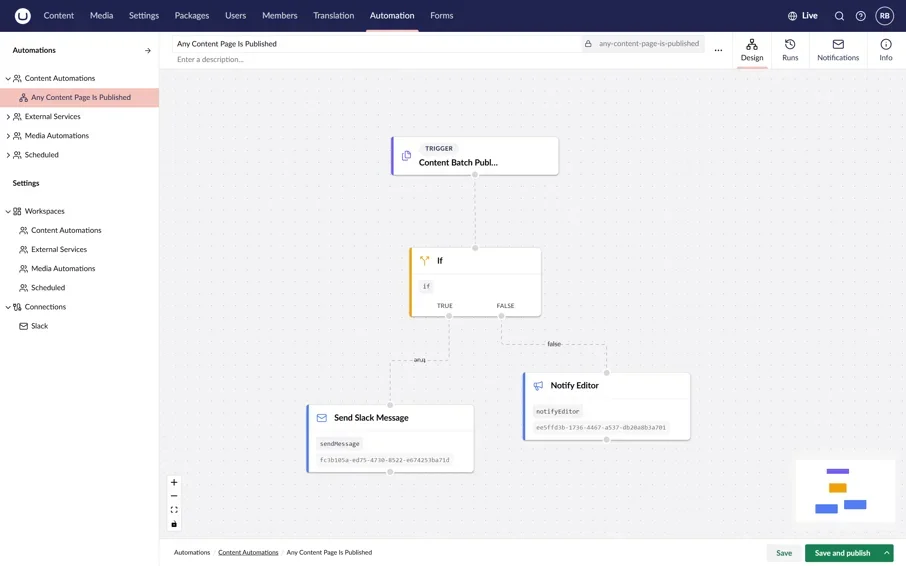
Automate in minutes
Build and run tasks in the Umbraco back-office.
Umbraco Automate replaces per-task SaaS tools like Zapier and Make.com. It is open source, runs on your own hosting and does not limit runs, triggers or users. Because it works inside the Umbraco back office, it can publish pages, edit media and update commerce data directly. External tools cannot do this.
Who is Umbraco Automate for?
Marketers: build customer journeys, automate content publishing and set up campaign alerts without code. The workflow is visual and does not need IT.
E-commerce and operations: trigger follow-ups and alerts when stock or order status changes in Umbraco Commerce. No more manual checks or missed updates.
Developers: offload repetitive requests and keep control through open-source C# extensibility, masked credentials and permission-controlled workspaces.
Compliance: customer data stays on your own infrastructure. Nothing leaves your environment.
Umbraco Automate vs. external SaaS tools
External tools like Zapier and Make.com charge per task, so costs scale with usage. Umbraco Automate is free, with no limits on runs, triggers or users. External tools also route your data through third-party servers, where Automate keeps it inside your own hosting environment. They can't natively edit pages, media or layouts either, whereas Automate has direct access to content, commerce and media. And where webhook tools can lag, Automate triggers instantly on the server side.
There are countless tasks Automate can take on. Lead routing is the obvious one - a qualified Umbraco Forms submission gets evaluated and pushed straight to Slack or wherever you want it, while still being logged to your database.
Upload a new campaign asset and an AI agent will draft alt-text and summaries into a review queue, so nothing publishes without someone signing off.
And if you're running Umbraco Engage alongside it, you can build personalised journeys on the fly, with content adapting automatically as a visitor's behaviour or persona score changes.
My recommendation is to use Umbraco Automate for site-native operations like forms, content and commerce logic, where speed and data residency matter more than pipeline depth.
Implementation plan
Start with a pilot in staging using one high-impact workflow, such as Umbraco Forms-to-Slack lead routing.
Developers pre-configure secure workspaces and masked credentials for external connections. Marketing selects from these when they create workflows.
Train your marketing team to build workflows using the visual canvas.
Review the results, then expand to additional workflows as needed.
-
The official docs cover everything you need to get started: core concepts, building your first automation and the available add-ons. Worth bookmarking before you start: docs.umbraco.com/umbraco-automate.
-
No. There is no cap on runs, triggers, actions, users, workspaces or connections. As you scale, metered SaaS tools track costs based on your volume. With Automate, cost stays flat.
-
You'll need a current version (v10 or later; check the release notes for your version) because it connects to the modern back office. Older v7 or v8 sites need an upgrade first.
-
Day-to-day changes like adjusting a condition or changing a Slack channel can be made by whoever built it. Developers only need to get involved if you add a new external connection or endpoint that needs new credentials.
-
It's a rebuild. There is no import tool, so you'll need to recreate each workflow on the new canvas. Plan for this as part of the pilot rather than trying to migrate everything at once.